Make your seating perfect; if you’ve comfortable chair, you can work for long straight hours without back pain.
How to Plan a Home Office Layout That Supports Long Workdays
Author
Swati Mishra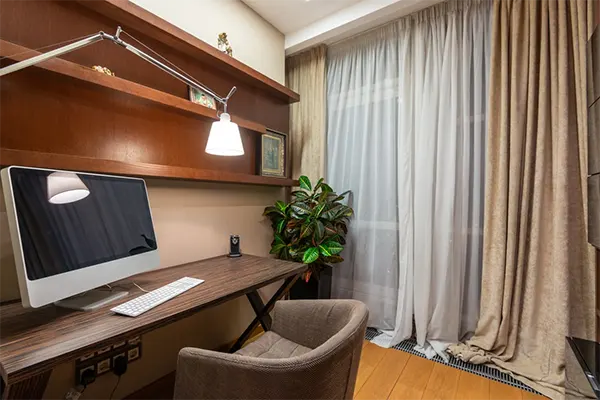
Do you also have long workdays at work from home? Then you’re not alone. This is a problem for all remote workers, and they are facing the same back problem. You have to change your sitting and make it comfortable, so you can work for straight hours without any back pain.
According to government statistics, 34.9% of full-time workers did at least some of their job at home on an average day in 2025. And now you have to change your seating. A poor home office setup won’t injure you on day one, but it sneaks up on you.
This article will provide you with the best seating step-by-step, along with your desk and screen.
Table of Contents:
Why Your Home Office Layout Matters
A study found that 37% of home workers have formed new back pain since starting to work distantly. That same study also discovered that 11% work from the sofa and 3% work from their bed!
It sounds logical, right? A couch should be used for relaxing around. Not for knocking out emails for 9 hours straight.
Good biotechnology puts all your needs within comfortable reach.
Start With Your Chair (Seriously)
If you only fix one thing in your home office… Make it your chair.
You know why it’s important? Because your chair is the only piece of furniture that your body connects with throughout the entire day. Your desk, screen, and keyboard are all placed around your chair.
Stop focusing on how a chair looks; instead, focus on how it adjusts. The highest-quality office chairs come filled with adjustable features that allow you to mould your seat to your body, not force your body to fit your seat. Height flexibility, lumbar support, and arm adjustments will assure you stay comfortable from your first cup of coffee to your very last meeting of the day.
So what should you look for?
Adjustable Office Chair Features Worth Paying For
Some flexibility isn’t worth spending extra cash on. However, these five are if you work long days.
Seat Height
This is the most basic modification… And the most important.
Your feet should rest flat on the floor with your knees bent at nearly a 90-degree angle. If your feet are hanging or your knees are pushed up toward the ceiling, the seat height is wrong.
Lumbar Support
Your lower back naturally curves inward. Lower back support fills that space so you won’t slouch.
Seek out adjustable lumbar support (up and down and, preferably, fore and back). Non-adjustable lumbar support only works if, by some wonder, it is straight with your body. Most often it’s not.
Armrests
Armrests soothe stress from your shoulders and neck. As long as they’re adjusted to the proper height.
Your elbows should rest lightly at about desk height with your shoulders relaxed. Height-adjustable, sideways-sliding armrests are ideal.
Seat Depth
This one gets overlooked a lot.
Seat depth establishes how far forward the seat pillow extends from the backrest. Allow about two or three fingers’ distance between the front of the seat and the back of your knees. If it’s too deep, it will cut off circulation. If it’s too flat, you will have no support for your thighs.
Tilt And Recline
Sitting upright all day is tiring.
A quality slant allows you to lean backward and shift your weight as you move through your day. Assure your chair has a tilt lock and tension control to adjust how much the chair pushes back.
Top tip: Try out the adjustments on any office chair you are contemplating purchasing. A lever that’s inflexible or feels cheap in the store will only feel inferior after 12 months of use.
Get Your Desk And Screen Height Right
Once your chair is classified, build the rest of your layout around it.
Sit down and adjust your chair first. Now adjust your desk. Your brace should be almost even with the desk when your elbows rest at your sides. If your desk is too high, your shoulders will be slumped. Too low and you will lean forward.
Next up… your screen.
Your monitor should be placed with the top of the monitor at (or slightly below) eye level and one arm’s length away. If you are using a laptop, purchase a laptop stand and an external keyboard and mouse. Watching down at a laptop all day is one of the quickest ways to develop a sore neck.
The basic rule:
- Chair first
- Desk second
- Screen third
Get the order right, and everything falls into place.
Plan Your Layout Around Light And Movement
Here’s something most people don’t think about: where you put your desk matters just as much as what’s on it.
Try placing your desk side-on to your window. Facing it causes a blaze in your eyes. Turning your back on it causes radiance to bounce off your monitor. Side-on allows you to benefit from natural light without blinking.
Now reflect movement. Long workdays aren’t only about sitting comfortably. They’re also about shirking sitting too long. Position your printer, water bottle, or bookshelf a few paces away from your workstation. It may sound silly, but those extra steps will require you to get up and extend every hour or two.
A few more layout tips:
- Keep your most-used items within arm’s reach
- Sprint cables along the wall or under the desk so you don’t trip
- Add a desk lamp for late afternoons when the light drops
Want to take it a step further? Look at a sit-stand desk.
Periodic sitting and standing several times throughout the day allows you to keep moving without interrupting your concentration. Ensure you adjust your chair and desk back down to the suitable heights when you return to sitting. The best functional desk setup is useless if you aren’t using it correctly.
Small changes. Big difference.
Putting It All Together
Your home office design doesn’t have to be refined or costly to contain long hours of work. It simply must be consistent with your body and your work style.
To quickly recap:
- Start with a chair that has the right adjustable office chair features
- Set your desk height to match your chair
- Raise your screen to eye level
- Position your desk side-on to natural light
- Build movement into your day
Master these essentials, and you’ll end your workday energised and (much) less painful. Your back will respect it!
FAQs
What is the most important part you can change at remote work?
What should be the level of your screen?
Your laptop or computer screen should be at eye level, that make it more comfortable to work.
How can I adjust my desk?
Firstly, put your desk in natural light that will not affect your eyes, and take a desk that matches your height so you can sit comfortably.
Latest Blog